









Why Is Your Home Battery Not Working? Common Problems and Troubleshooting Tips


When Your Home Battery Doesn't Work as Expected
Your home battery is connected, but the inverter cannot detect it. Perhaps the system displays an error message, or the battery has no output voltage. These problems can affect your home energy storage system, but they do not always mean the battery itself has failed.
Communication settings, cable connections, accessory compatibility, and the battery management system (BMS) may all play a role. Understanding the possible causes can help you identify what to check and when to seek professional assistance.
In this guide, we'll explore common home battery problems and practical troubleshooting tips for homeowners and installers.

Common Signs Your Home Battery Is Not Working Properly
Home battery problems may appear in several ways:
Communication failure: The inverter cannot detect the battery or retrieve its status.
Abnormal battery status: The monitoring interface displays an unexpected status or error message.
No output voltage: The battery is connected, but the system does not receive the expected output.
Cable or connector mismatch: Power cable terminals or communication connectors do not fit the battery.
Intermittent communication: The connection works initially but experiences occasional interruptions.
These symptoms can have different causes. Checking the system methodically is more useful than immediately assuming the battery is damaged.
Why Is Your Home Battery Not Communicating with the Inverter?
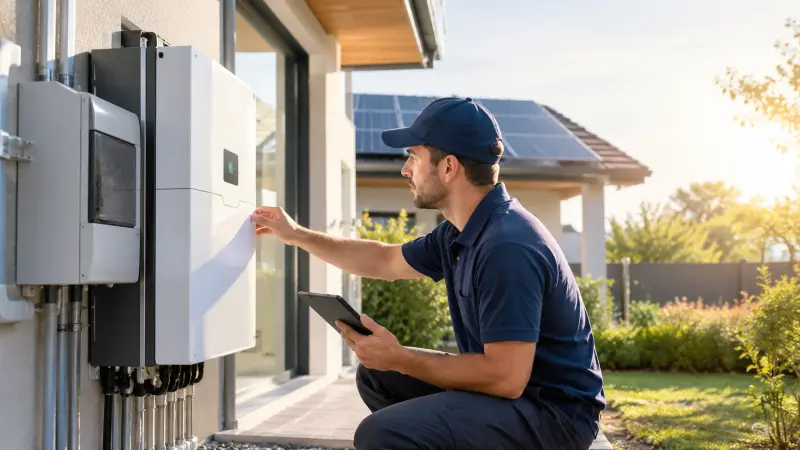
Communication allows the battery and inverter to exchange operating information. If this connection fails, the inverter may not display battery status correctly or operate as intended.
1. Communication Cable Issues
Different inverter models may use different communication cable pinouts. Cables with similar connectors are not necessarily wired in the same way.
What to do: Check that the communication cable is compatible with both devices. Compare its wiring and pinout with the manufacturers' connection diagrams, and inspect accessible connectors for visible damage or looseness. Replace an incompatible cable with the correct specification rather than changing the wiring based on appearance alone.
2. Communication Protocol Incompatibility
Even when the cable is connected correctly, the battery and inverter may not support the same communication protocol. An inverter's firmware version may also affect compatibility.
What to do: Check the manufacturers' compatibility lists and confirm that the selected communication protocol and inverter settings match the product instructions. If a firmware update is recommended, follow the manufacturer's approved procedure or contact technical support.
3. Incorrect Settings or Environmental Interference
Incorrect inverter settings may prevent successful communication. Electromagnetic interference can also contribute to intermittent connection problems, particularly when communication cables run alongside high-power cables.
What to do: Verify the inverter's operating status and communication settings. If interference is suspected, ask the installer to inspect cable routing and separate communication cables from power cables where required.
If communication still fails after these checks, a qualified technician may need to investigate a hardware fault.
Why Does Your Home Battery Have No Output Voltage?
When a home battery has no output voltage, the cause may involve the BMS, external connections, or a battery-related fault. The displayed status and error messages can help guide further investigation.
1. The BMS May Be in Sleep or Protection Mode
The battery management system monitors operating conditions and helps protect the battery. Depending on the product design, the BMS may enter sleep or protection mode, affecting power output.
What to do: Check the battery's indicators or monitoring interface for its current status and any protection alerts. Follow the product manual if it specifies an approved wake-up or reset procedure. If the battery remains in protection mode, contact technical support.
Never bypass battery protection or open the enclosure to force an output.
2. Loose or Damaged Connections
Loose, improperly installed, or damaged connections may interrupt the power path between the battery and connected equipment.
What to do: Look for visible damage to accessible external cables and connectors, including discoloration or burn marks. If damage or abnormal heating is observed, stop using the system and arrange for a qualified technician to inspect it. Do not touch exposed conductors or attempt to disconnect live battery connections.
3. A Battery or BMS Fault May Be Present
If the BMS status appears normal but the battery still has no output, further inspection may be necessary. The issue could involve the battery monitoring circuit, an internal connection, or another component.
What to do: Record the battery's status, error codes, and the circumstances in which the problem started. A qualified technician can perform the necessary checks using the manufacturer's approved procedures and determine whether repair or component replacement is required.
The absence of output voltage alone is not enough to confirm an internal battery failure.
Are Your Battery Accessories Compatible?
Some home battery problems arise from mismatched accessories rather than faults within the battery.
1. Power Cable Terminals Do Not Fit
The copper lugs on a power cable may not match the battery terminal dimensions or connection requirements.
Solution: Check the required terminal type and specifications in the product documentation. Use compatible components and have a qualified installer handle replacement if the connection cannot be made securely.
2. The Communication Cable Cannot Connect
The cable connector may not match the battery interface. Even if a connector looks similar, that does not guarantee electrical or protocol compatibility.
Solution: Confirm the connector type and cable specification for the battery-inverter combination. Never force a connector into an interface or substitute an unverified cable.
3. Wall-Mounting Hardware Does Not Fit
For wall-mounted batteries, the supplied expansion bolts may not meet the installation requirements or suit the mounting surface.
Solution: Follow the installation manual for fastener quantity and specifications. A qualified installer should select suitable mounting hardware based on the product requirements and wall structure to ensure secure support.
Correct accessory selection helps prevent installation delays and avoidable connection problems.
When Should You Contact Technical Support?
Basic checks can help identify obvious compatibility or configuration issues, but electrical storage systems require careful handling. Contact your installer or the manufacturer's technical support team if:
Communication still fails after compatibility and settings checks.
The battery continues to show no output voltage or remains in protection mode.
You notice damaged connectors, burn marks, abnormal heating, swelling, or other unusual physical conditions.
The problem may involve the BMS, internal wiring, or battery components.
To help the service team investigate, prepare the battery and inverter models, any error codes, screenshots of the monitoring interface, and a brief description of when the issue began. Photos of external connections may also help, provided they can be taken safely without touching or opening the equipment.
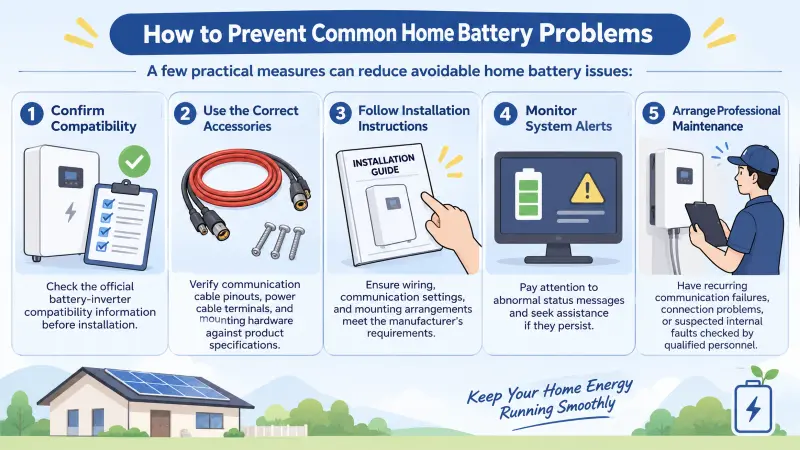
How to Prevent Common Home Battery Problems
A few practical measures can reduce avoidable home battery issues:
Confirm compatibility: Check the official battery-inverter compatibility information before installation.
Use the correct accessories: Verify communication cable pinouts, power cable terminals, and mounting hardware against product specifications.
Follow installation instructions: Ensure wiring, communication settings, and mounting arrangements meet the manufacturer's requirements.
Monitor system alerts: Pay attention to abnormal status messages and seek assistance if they persist.
Arrange professional maintenance: Have recurring communication failures, connection problems, or suspected internal faults checked by qualified personnel.
Following the manufacturer's guidance helps installers and homeowners identify problems more systematically.
FAQs About Home Battery Troubleshooting
Why is my home battery not communicating with the inverter?
Possible causes include incompatible communication protocols, incorrect cable pinouts, unsuitable inverter settings, or damaged connections. Check compatibility and wiring instructions first, then contact technical support if the problem persists.
Why does my home battery have no output voltage?
The BMS may be in sleep or protection mode, an external connection may be faulty, or a battery-related issue may require further investigation. Check the displayed status and follow the product manual. Leave internal electrical checks to qualified personnel.
Can an incompatible inverter cause home battery problems?
Yes. If the inverter does not support the battery's communication protocol or required configuration, communication may fail. Confirm compatibility before installation.
What should I do if my battery communication cable does not fit?
Do not force the connector. Check the cable and interface specifications, then obtain a compatible cable approved for the system.
When should I contact a professional?
Seek professional assistance if communication failures persist, the battery has no output voltage, protection alerts remain active, or you notice signs of electrical or physical damage.
Keep Your Home Energy Storage System Running as Intended
When a home battery stops working as expected, the cause may be related to communication, settings, connections, or accessory compatibility rather than a failed battery.
By identifying the symptoms, checking the product documentation, and seeking professional assistance when necessary, homeowners and installers can troubleshoot problems more systematically.
Explore LEOCH's residential energy storage solutions to learn more about battery options for home energy storage applications.





Looking for a Reliable Global Energy Partner?
Connect with our global team to design a custom energy solution for your next project.